Search This Blog

Friday, June 19, 2015

How can I publish an Android app free in the Google Play store?

Ananthu Anil
Ananthu AnilContent Writer, designer
4 upvotes by Quora UserAnonymous, Akshit Rewari, and Quora User
As sad as it is, you can't. Google put the fee for the developer account so that random malware and unwanted things aren't uploaded on to it. With a fee people will think twice before making an app that won't make any turnover. So this increases the quality of apps available on the store to some extent. 

Even then, a little googling turned up an xda article stating that they have a dev account and would happily upload the apk for free. Of course, your app will end up in someone else's hands.  

If you have a great idea for an app, pay thay initial fee. The money you'll make from Google's ads program will be enough to make it profitable. 

Happy developing. 

Thanks for the A2A.

Wednesday, June 3, 2015

Robots that recover from damage in two minutes

LONDON: Scientists have developed next-generation of robots that automatically recover from injury in less than two minutes by adapting like humans and animals.

A video shows a six-legged robot that adapts to keep walking even if two of its legs are broken. It also shows a robotic arm that learned how to correctly place an object even with several broken motors.

In contrast to today's robots, animals exhibit an amazing ability to adapt to injury.

There are many three-legged dogs that can catch Frisbees, for example, and if your ankle is sprained, you quickly figure out a way to walk despite the injury.

The scientists took inspiration from these biological strategies.

Before it is deployed, the robot uses a computer simulation of itself to create a detailed map of the space of high-performing behaviours.

This map represents the robot's 'intuitions' about different behaviours it can perform and their predicted value.

If the robot is damaged, it uses these intuitions to guide a learning algorithm that conducts experiments to rapidly discover a compensatory behaviour that works despite the damage.

The new algorithm is called 'Intelligent Trial and Error.'

"Once damaged, the robot becomes like a scientist," said lead author Antoine Cully from the Pierre and Marie Curie University in France.

"It has prior expectations about different behaviours that might work, and begins testing them. However, these predictions come from the simulated, undamaged robot. It has to find out which of them work, not only in reality, but given the damage.

"Each behaviour it tries is like an experiment and, if one behaviour doesn't work, the robot is smart enough to rule out that entire type of behaviour and try a new type," Cully said.

"For example, if walking, mostly on its hind legs, does not work well, it will next

Tuesday, June 2, 2015

HTML redirection

HTML redirect. HTML meta refresh redirection code.

HTML meta refresh redirect is a client side redirect and is not 301 permanent redirect.
The HTML meta refresh with 0 seconds time interval, is considered by Google as a hint for 301 redirect for pagerank transfer.
If you want to do real 301 permanent redirect, you can do it with PHP redirect after enabling PHP code in HTML files.

HTML meta refresh redirect

The redirection is done with the meta refresh in the head section.
The link in the body section for fallback purposes.
Replace old page with redirection code with the URL of the page you want to redirect to.
old-page.html:
<!DOCTYPE html>
<html>
<head>
   <!-- HTML meta refresh URL redirection -->
   <meta http-equiv="refresh"
   content="0; url=http://www.mydomain.com/new-page.html">
</head>
<body>
   <p>The page has moved to:
   <a href="http://www.mydomain.com/new-page.html">this page</a></p>
</body>
</html>

HTML meta refresh redirect example

html-redirect-test.htm:
<!DOCTYPE html>
<html>
<head>
   <!-- HTML meta refresh URL redirection -->
   <meta http-equiv="refresh"
   content="0; url=http://www.rapidtables.com/web/dev/html-redirect.htm">
</head>
<body>
   <p>The page has moved to:
   <a href="http://www.rapidtables.com/web/dev/html-redirect.htm">this page</a></p>
</body>
</html>

Press this link to redirect from html-redirect-test.htm back to this page:

HTML canonical link tag redirect

The canonical link does not redirect to the preffred URL, but it can be an alternative to URL redirection for websites that most of the traffic arrives from search engines.
HTML canonical link tag can be used when there are several pages with similar content and you want to tell the search engines which page you preffer to use in the search results.
Canonical link tag can link to the same domain and also cross-domain.
Add the canonical link tag to the old page to link to the new page.
Add the canonical link tag to the pages that you preffer not to get search engines traffic to link to the preffered page.
The canonical link tag should be added in the <head> section.
old-page.html:
<link rel="canonical" href="http://www.mydomain.com/new-page.html">

URL redirection ►

URL HTTP Redirection

URL http redirection is an automatic URL change operation from one URL to another URL.

URL redirection

URL page redirection is an automatic URL change operation from one URL to another URL.
This redirection is done for the following reasons:
  1. Redirect from old obsolete URL to a new updated URL.
  2. Redirect from old obsolete domain to a new domain.
  3. Redirect from non www domain name to a www domain name.
  4. Redirect from short URL name to a long URL name - URL shortening service.
  5. URL shortening service will allow the user to insert a short URL and be redirected the the long URL that has the real page contents.
The user may reach the old URL from an old external links or a bookmark.
by the site's webmaster who adds a script.

Server side redirect

Server side redirection is done in the server, by configuring the Apache / IIS server software or by using PHP / ASP / ASP.NET script.
This is the preferred way to redirect URLs, since you can return HTTP 301 Moved Permanently status code.
Search engines use the 301 status to transfer the page rank from the old URL to the new URL.

Client side redirect

Client side redirection is done in the web browser of the user, by using HTML meta refresh tag or by Javascript code.
Client redirect is less preferred, since it does not return HTTP 301 status code.

Where to put redirect code

Domain
name
Hosting
server
Redirect code
placement
not changednot changedold page on same server
not changedchangedold page on new server
changednot changedold page on same server
changedchangedold page on old server
* Only with .htaccess redirect: add redirect code to httpd.conf file or to .htaccess file.

HTTP status codes

Status codeStatus code nameDescription
200OKsuccessful HTTP request
300Multiple Choices 
301Moved Permanentlypermanent URL redirection
302Foundtemporary URL redirection
303See Other 
304Not Modified 
305Use Proxy 
307Temporary Redirect 
404Not FoundURL not found

HTTP 301 redirect

HTTP 301 Moved Permanently status code means a permanent URL redirection.
The 301 redirect is the preferred way to redirect URLs, since it informs search engines that the URL has moved for good, and search engines should put the new URL page in the search results instead of the old URL page and transfer the new URL page, the page rank of the old URL page.
The 301 redirect can be done across domains or on the same domain.
Google recommends to use 301 redirect.

Redirect options

Redirect scriptRedirect sideOld page file typeRedirect URL or domainOld URL server type301 redirect support
PHPServer-side.phpURLApache / Linuxyes
ASPServer-side.aspURLIIS / Windowsyes
ASP.NETServer-side.aspxURLIIS / Windowsyes
.htaccessServer-sideallURL / DomainApache / Linuxyes
IISServer-sideallURL / DomainIIS / Windowsyes
HTML canonical link tagClient-side.htmlURLallno
HTML meta refreshClient-side.htmlURLallno
HTML frameClient-side.htmlURLallno
JavascriptClient-side.htmlURLallno
jQueryClient-side.htmlURLallno
redirect script - the scripting language that is used for the redirection.
redirect side - where the redirection takes place - server-side or client-side.
old page file type - the type of the old URL page that can can contain the scripting language of the redirect code.
redirect URL or domain - does support URL redirection of a single web page or domain redirection of a whole website.
typical old URL server type - the typical software and operating system of the server.
301 redirect support - indicates whether permanent 301 redirect status response can be returned.

PHP redirect

Replace old-page.php code with redirection code to new-page.php.
old_page.php:
<?php
// PHP permanent URL redirection
header("Location: http://www.mydomain.com/new-page.php", true, 301);
exit();
?>
The old page must have .php file extension.
The new page can be with any extension.

Apache .htaccess redirect

.htaccess file is a local configuration file of the Apache server.
If you have permission the change the httpd.conf file, it is better to add the Redirect directive in thehttpd.conf instead of the .htaccess file.

Single URL redirect

Permanent redirect from old-page.html to new-page.html.
.htaccess:
Redirect 301 /old-page.html http://www.mydomain.com/new-page.html

Entire domain redirect

Permanent redirect from all domain pages to newdomain.com.
 .htaccess file should be at the old website's root directory.
.htaccess:
Redirect 301 / http://www.newdomain.com/

ASP redirect

old-page.asp:
<%@ Language="VBScript" %>
<%
' ASP permanent URL redirection
Response.Status="301 Moved Permanently"
Response.AddHeader "Location", "http://www.mydomain.com/new-page.html"
Response.End
%>

ASP.NET redirect

old-page.aspx:
<script language="C#" runat="server">
// ASP.net permanent URL redirection
private void Page_Load(object sender, EventArgs e)
{
   Response.Status = "301 Moved Permanently";
   Response.AddHeader("Location","http://www.mydomain.com/new-page.html");
   Response.End();
}
</script>

HTML meta refresh redirect

HTML meta refresh tag redirection does not return 301 permanent redirect status code, but considered by Google as a 301 redirect.
Replace old page with redirection code with the URL of the page you want to redirect to.
old-page.html:
<!-- HTML meta refresh URL redirection -->
<html>
<head>
   <meta http-equiv="refresh" 
   content="0; url=http://www.mydomain.com/new-page.html">
</head>
<body>
   <p>The page has moved to:
   <a href="http://www.mydomain.com/new-page.html">this page</a></p>
</body>
</html>

Javascript redirect

Javascript redirect does not return 301 permanent redirect status code.
Replace old page with redirection code with the URL of the page you want to redirect to.
old-page.html:
<html>
<body>
<script type="text/javascript">
    // Javascript URL redirection
    window.location.replace("http://www.mydomain.com/new-page.html");
</script>
</body>
</html>

jQuery redirect

jQuery redirect is actually another type of Javascript redirect.
jQuery redirect does not return 301 permanent redirect status code.
Replace old page with redirection code with the URL of the page you want to redirect to.
old-page.html:
<!DOCTYPE html>
<html>
<body>
<script src="http://ajax.googleapis.com/ajax/libs/jquery/1.10.2/jquery.min.js"></script>
<script type="text/javascript">
   // jQuery URL redirection
   $(document).ready( function() {
      url = "http://www.mydomain.com/new-page.html";
      $( location ).attr("href", url);
  });
</script>
</body>
</html>

HTML canonical link tag redirect

The canonical link does not redirect to the preffred URL, but it can be an alternative to URL redirection for websites that most of the traffic arrives from search engines.
HTML canonical link tag can be used when there are several pages with similar content and you want to tell the search engines which page you preffer to use in the search results.
Canonical link tag can link to the same domain and also cross-domain.
Add the canonical link tag to the old page to link to the new page.
Add the canonical link tag to the pages that you preffer not to get search engines traffic to link to the preffered page.
The canonical link tag should be added in the <head> section.
old-page.html:
<link rel="canonical" href="http://www.mydomain.com/new-page.html">

HTML frame redirect

In frame redirection the new-page.html file is viewed by an html frame.
This is not a real URL redirection.
Frame redirection is not search engines friendly and is not recommended.
old-page.html:
<!-- HTML frame redirection -->
<html>
<head>
    <title>Title of new page</title>
</head>
<frameset cols="100%">
    <frame src="http://www.mydomain.com/new-page.html">
    <noframes>
     <a href="http://www.mydomain.com/new-page.html">Link to new page</a>
    </noframes>
</frameset>
</html>

Saturday, May 23, 2015

Nasa's Hubble Telescope Finds 'Nasty' Star in Milky Way

Nasa's Hubble space telescope has spotted a weird star in our galaxy and has been nicknamed "nasty" owing to its behaviour never seen before.
The hefty, rapidly ageing star "Nasty 1" may represent a brief transitory stage in the evolution of extremely massive stars.
First discovered several decades ago, "Nasty 1" was identified as a Wolf-Rayet star, a rapidly-evolving star that is much more massive than Sun.
The star loses its hydrogen-filled outer layers quickly, exposing its super-hot and extremely bright helium-burning core.
But "Nasty 1" does not look like a typical Wolf-Rayet star.
Hubble revealed a pancake-shaped disk of gas encircling the star.
The vast disk is nearly two trillion miles wide.
Based on current estimates, the nebula surrounding the stars is just a few thousand years old and as close as 3,000 light-years from the Earth.
According to astronomers, this disc is the result of an exceedingly rare occurrence wherein two Wolf-Rayets form within the same solar system and one star's hydrogen fuel is siphoned off by its smaller companion.
"We were excited to see this disk-like structure because it may be evidence for a Wolf-Rayet star forming from a binary interaction," explained study leader Jon Mauerhan from the University of California-Berkeley in a statement.
There are very few examples in the galaxy of this process in action because this phase is short-lived, perhaps lasting only a hundred thousand years, while the timescale over which a resulting disk is visible could be only ten thousand years or less.
"What evolutionary path the star will take is uncertain, but it will definitely not be boring," the authors noted.

With SWYO, Stream PC Games to Your Mobile, Tablet, or PC

Streaming games is something that many companies including Sony, Steam, and Nvidia have been working on. So far at least, success in this field has been limited.
Two independent companies that raised a lot of attention in this field were Gaikai and OnLive, both of which promised to allow you to stream games running on their servers across the Internet, so you could play a high-end game on a netbook, for example. Today, neither Gaikai nor OnLive exist. Sony acquired Gaikai in 2012, and it is likely using the same technology for its PlayStation Now service. OnLive, which launched complete with special hardware, went bankrupt. Sony also acquired the "important parts" of OnLive in 2015, but announced no plan to continue the service in it's "current form," suggesting that OnLive's technology would likely be used to add to PlayStation Now.
Steam and Nvidia, on the other hand, focused on letting you stream the games you own. The catch is that this works with only select hardware, and also requires the kind of PC setup that many people won't have. There are also now some Android apps that make use of the same graphics cards to allow you to play PC games on your phone or tablet, working with game controllers such as the Xbox 360 controller or the PS3 controller. If you're a gamer who's keeping up with the latest developments, this isn't much of an obstacle - but if you're a couple of years out of date, and just want to stream an older game like Portal, your options are limited.
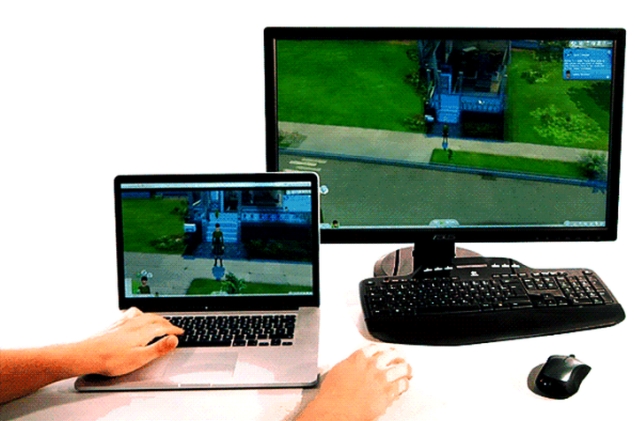
A new Kickstarter project called SWYO, made by a team of Indian and German developers, wants to address this gap. SevenRE, the company behind SWYO, says it has created a client which will allow you to stream games from your PC to another PC or mobile phone running a browser or an app. It's not quite the same idea as OnLive or Gaikai - you still need to have a PC that is powerful enough to run the game in the first place.
Another cool feature, as explained in the Kickstarter video, is that SWYO can be used to let a remote player control your local game - this could be used to remotely do local co-op for a game that doesn't support online multiplayer, or you could pass the controls for a tough segment of a game over to a friend.
Pratip Chakraborty, the CEO of SevenRE, chatted with NDTV Gadgets over email to clear up some questions about SWYO.
swyo_mobile.jpg
"We're a two year old technology consulting startup, and we've been building out the Stream What You Own (SWYO) prototype for the last one year," he explains. "We have a working proof of concept now, and we're now trying to raise funds for full time development on the project."
Chakraborty tells us that SWYO can be used to stream not just your games, but also music and movies to the app on your phone if you want. Your PC can also be set up to power on remotely, so you don't even need to keep it running; just install SWYO, and then when you want to watch something, or play a game, simply press a button in the app.
"In a nutshell, SWYO aims to create a personal cloud solution, that's not bound to hardware or a local network," Chakraborty adds. "And we wanted to make sure you can do it either via the browser, or on your phone."
According to Chakraborty, the big advantage of SWYO is that you don't need to install a client to play games - it's a browser-based solution means that isn't tied down to any specific operating system, and you can play games from a Windows, Mac or Linux computer without worrying about how installing any software.
"You could just go to a friends' house and then play games that are installed at [your] home," says Chakraborty. You don't need additional hardware over and above the standard requirements of your games, he claims.
"We support both hardware encoding using AMD's Media SDK, and Nvidia's GameStream, as well as CPU encoding," explains Chakraborty. "If your computer can run the game without maxing out the CPU, then you can stream it and play via SWYO." And if things aren't working smoothly, then just dial down the graphics settings a touch and you'll see the game run fine.
There's no demo to try out now, but SevenRE promises that the latency is low enough not to affect gaming. The prototype seems to work smoothly on different devices - we looked at some videos of SWYO in action on a laptop, and on a Google Nexus 5:
Watching someone play Shadow of Mordor on a Nexus 5 is promising, and the game seemed to run smoothly too:
According to Chakraborty, SWYO isn't affected by Steam's DRM - something that would matter to many, (if not all), PC gamers. The computer or phone you're streaming on simply needs to be capable of HD video playback. In case you're streaming to a PC, then you need to a browser that supports Flash, ideally Firefox or Chrome, Chakraborty explains.
And game streaming is just one part of SevenRE's plan - they're also going to sell software licenses to businesses, and plan to compete with remote presentation and PC access services like TeamViewer.
"Our tech fills the gaps and enhances existing solutions," says Chakraborty. "TeamViewer lacks gaming capabilities. Remote Play is Nvidia only, and Steam needs both computers to be on the same local network. In the diverse streaming ecosystem, SWYO is all about feature unification, ease, power of sharing, and personalisation."
While that sounds good, the fact remains there's nothing concrete beyond a few videos SevenRE has put up to demonstrate the concept. There's not trial version you can download, to see how effective it is today, or to decide if it's worth putting down the money to back the company as yet. But leaving aside SevenRE's bigger plans of selling corporate tools, as a gamer, the idea is interesting.
You're not locked down to a specific library of games, or a specific set of hardware. It'll work with your GOG, Steam, and Origin games. It'll work if you have an AMD graphics card or an Nvidia card. You just need to install the SWYO server software on your PC, and that's it. And it doesn't require a cutting edge gaming PC on the client-side either.
The bandwidth requirement means that if you're in India, you definitely don't want to try doing this over the Internet, but local streaming from your desktop to different screens in your house should work just fine. There's a lot of appeal to the idea, and we're cautiously optimistic to see how it all turns out.

Now You Don't Need To Add Zero Before Dialling An STD Mobile Number

Indian telecom operators have started the process of removing the 0 and 91 STD prefix for dialling a mobile number. 
The technical changes seem to have rolled out by operators this week; we tested this on Vodafone and Airtel numbers based out of Delhi and are getting reports of the rollout from other parts of the country as well.
The changes are in compliance with DoT’s (Department of Telecom) deadline on implementation for full mobile number portability (MNP), which was extended by two months from May 3 earlier this month.
The DoT had approved TRAI’s recommendations on MNP on November 2014, and had fixed an implementation deadline of six months.
Full MNP will allow subscribers to retain their mobile number in any part of the country even when they change their operator or state. At present, MNP allows subscribers to change mobile network while retaining their number in the same telecom circle.
Telecom operators will be spending around Rs 200-300 crore to upgrade their networks to implement full MNP across India, reported Business Standard.
TRAI had reported a total telephone subscriber base of 996.49 million users at the end of March 2015, out of which a 3.84 million subscribers had submitted their requests for mobile number portability.

Intex teams up with Singapore firm to launch free calling app Nanu


SINGAPORE: A Singapore-based mobile application company has entered into a partnership with Indian smartphone maker Intex Technologies to make a free calling app named Nanu.

Intex would be launching its two smartphone models, embedded with Nanu software in July, Gentay Communications Pte Ltd, said in a statement.

"The free-call Nanu, which subsidizes cost through targeted advertising on ring tones of dialers is designed to operate in 2G areas, opening up to a market of millions of rural folks," said Martin Nygate, CEO of Gentay Communications, the parent company of Nanu.

He said Nanu was already downloaded by 1.5 million subscribers in India, out of the 2.2 million subscribers globally.

"India is our biggest market and as such we have teamed up with Intex to launch it through two new smartphones which will be on the market in July," Nygate told PTI.

Unlike conventional voice calling apps, Nanu provides its all call for free, including calls to non-Nanu users on landlines and mobiles anywhere in the world.

It can also be used on any network including 2G, allowing Nanu to provide high-quality calls from locations where other apps do not work, Nygate said.

"Having Nanu embedded in smartphones means millions of people in rural and developing areas will now have access to free calls by just inserting SIM card in their newly purchased phones," he said.

"Smartphones have become an increasingly competitive sector, especially in India where cost performance is vital. You need to provide customers with something more than just a gadget," said Sanjay Kumar Kalirona business head of mobiles, Intex Technologies (India) Ltd.

"We believe that embedding Nanu will not only prove to be a big attraction but will also revolutionise the market. The new phones with Nanu will help Intex further differentiate ourselves from our closest competitors," said Kalirona.

Nygate said that Nanu has software designed to promote advertisements on the ring tones as the dialer make a call.

"It is a unique and dedicated on the ear advertisement that gives Nanu an advantage in promoting media," he said.

Stay updated on the go with Times of India News App. Click here to download it for your device.